配置
了解如何在 Auto-Coder.Chat 中配置模型和 API Key。
配置
使用 Auto-Coder.Chat 的第一步是配置你要使用的模型。进入项目目录,启动 CLI:
cd your-project
auto-coder.chat
查看可用模型
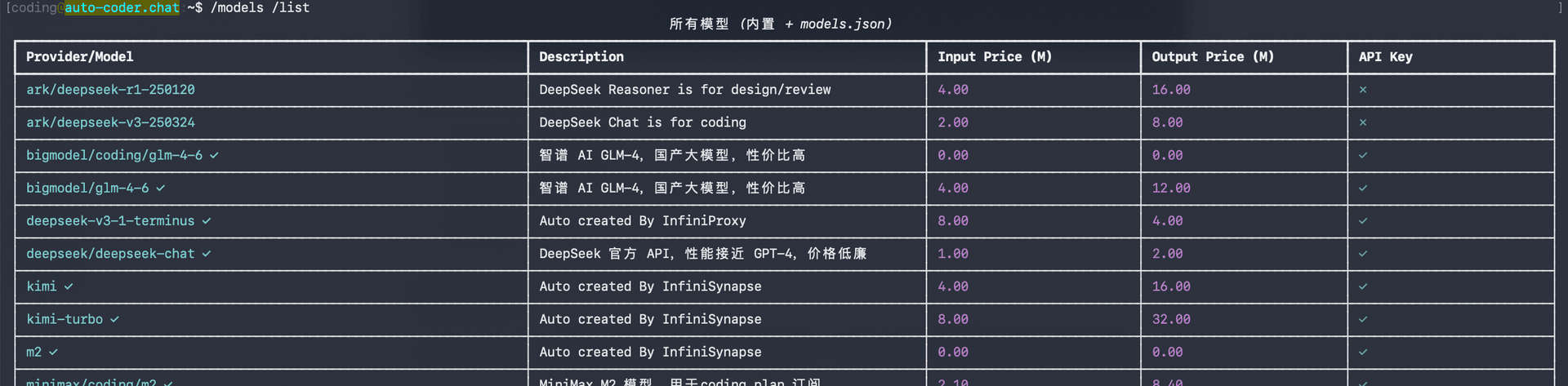
运行以下命令查看所有可用模型:
/models /list
你将看到内置支持的模型列表,包括 Provider、描述、价格和 API Key 状态:
Tab 补全:输入
/mo后按 Tab 键即可自动补全为/models,子命令同样支持 Tab 补全。
配置模型 API Key
使用 /models 命令为模型配置 API Key:
/models <模型名称> <YOUR_API_KEY>
例如,配置火山引擎 Coding Plan 的 DeepSeek V3.2:
/models volcengine/coding/deepseek-v3.2 YOUR_API_KEY其中第一个参数是模型名称(如 volcengine/coding/deepseek-v3.2),第二个参数是你的 API Key。
Coding Plan 与普通 API Key
模型名称中带有 coding 的表示该模型使用的是厂商的 Coding Plan 计划,你需要使用对应的 Coding Plan API Key。
| 模型名称示例 | 类型 | API Key 要求 |
|---|---|---|
volcengine/coding/deepseek-v3.2 | Coding Plan | 需要火山引擎 Coding Plan 的 API Key |
bigmodel/coding/glm-4-6 | Coding Plan | 需要智谱 Coding Plan 的 API Key |
deepseek/deepseek-chat | 普通 API | 使用 DeepSeek 官方 API Key |
ark/deepseek-v3-250324 | 普通 API | 使用火山引擎正常的 API Key |
简单判断:名称中带 coding → Coding Plan Key;不带 → 官方正常 API Key。
配置视觉模型
Auto-Coder.Chat 支持配置视觉模型(VL Model),用于理解图片、截图等视觉内容。使用 /conf 命令进行配置:
/conf vl_model:volcengine/doubao-seed-1-6-thinking推荐使用 volcengine/doubao-seed-1-6-thinking,该模型在图片理解和推理方面表现优秀。
视觉模型同样需要对应的 API Key 已配置。请确保你已通过
/models命令为该模型配置好 API Key。
下一步
模型配置完成后,请查看基本用法了解日常使用方法。